
广告牌是通过调用
在 3D 场景中定位的视口对齐图像,使用 BillboardCollection#add 创建的,并且其初始
属性被设置。请勿直接调用构造函数。
BillboardCollection 创建和渲染。
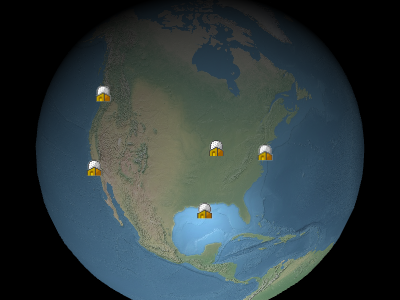
示例广告牌
Performance:
读取属性,例如 Billboard#show,是常数时间。
赋值给属性是常数时间,但在调用 BillboardCollection#update 时会导致
CPU 到 GPU 的流量。每个广告牌的流量与更新的属性数量无关。如果集合中的大多数广告牌
需要更新,使用 BillboardCollection#removeAll 清空集合并添加新广告牌
而不是修改每个广告牌可能更有效。
| Name | Type | Description |
|---|---|---|
options |
Billboard.ConstructorOptions | 描述初始化选项的对象 |
billboardCollection |
BillboardCollection | BillboardCollection 的实例 |
Throws:
-
DeveloperError : scaleByDistance.far 必须大于 scaleByDistance.near
-
DeveloperError : translucencyByDistance.far 必须大于 translucencyByDistance.near
-
DeveloperError : pixelOffsetScaleByDistance.far 必须大于 pixelOffsetScaleByDistance.near
-
DeveloperError : distanceDisplayCondition.far 必须大于 distanceDisplayCondition.near
Members
alignedAxis : Cartesian3
获取或设置在世界空间中的对齐轴。对齐轴是广告牌向上的向量指向的单位向量。
默认值是零向量,这意味着广告牌与屏幕的向上向量对齐。
Examples:
// Example 1.
// Have the billboard up vector point north
billboard.alignedAxis = Cesium.Cartesian3.UNIT_Z;
// Example 2.
// Have the billboard point east.
billboard.alignedAxis = Cesium.Cartesian3.UNIT_Z;
billboard.rotation = -Cesium.Math.PI_OVER_TWO;// Example 3.
// Reset the aligned axis
billboard.alignedAxis = Cesium.Cartesian3.ZERO;
获取或设置与广告牌的纹理相乘的颜色。这有两个常见的使用案例。首先,
相同的白色纹理可以被许多不同的广告牌使用,每个广告牌都有不同的颜色,从而创建
彩色广告牌。其次,颜色的 alpha 组件可以用于使广告牌半透明,如下所示。
alpha 为
红色、绿色、蓝色和 alpha 值由
0.0 使广告牌透明,而 1.0 使广告牌不透明。
default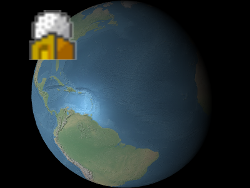 |
alpha : 0.5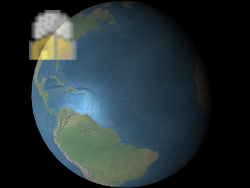 |
红色、绿色、蓝色和 alpha 值由
value 的 red、green、
blue 和 alpha 属性指示,如示例 1 所示。这些组件的范围从 0.0
(无强度)到 1.0 (完全强度)
Examples:
// Example 1. Assign yellow.
b.color = Cesium.Color.YELLOW;
// Example 2. Make a billboard 50% translucent.
b.color = new Cesium.Color(1.0, 1.0, 1.0, 0.5);
获取或设置从相机到禁用深度测试的距离,例如,用于防止与地形剪切。
设置为零时,始终应用深度测试。设置为 Number.POSITIVE_INFINITY 时,深度测试永远不应用。
distanceDisplayCondition : DistanceDisplayCondition
获取或设置指定从相机到此广告牌将显示的距离的条件。
-
Default Value:
undefined
eyeOffset : Cartesian3
获取或设置应用于此广告牌的眼睛坐标系中的三维笛卡尔偏移。眼睛坐标系是一个左手坐标
系,其中
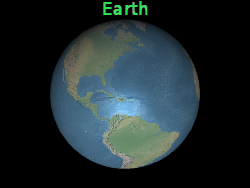
眼睛偏移通常用于将多个广告牌或对象安排在相同的位置,例如,将一个广告牌放置在其 相关三维模型的上方。
下方的广告牌被放置在地球中心,但眼睛偏移使其始终出现在地球顶部,而不管观察者或 地球的方向如何。
x 指向观察者的右侧,y 指向上方,z 指向屏幕内。
眼睛坐标系使用与世界坐标和模型坐标相同的比例,通常为米。
眼睛偏移通常用于将多个广告牌或对象安排在相同的位置,例如,将一个广告牌放置在其 相关三维模型的上方。
下方的广告牌被放置在地球中心,但眼睛偏移使其始终出现在地球顶部,而不管观察者或 地球的方向如何。
 |
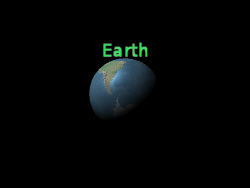 |
b.eyeOffset = new Cartesian3(0.0, 8000000.0, 0.0);
获取或设置广告牌的高度。如果未定义,将使用图像高度。
heightReference : HeightReference
获取或设置此广告牌的高度参考。
-
Default Value:
HeightReference.NONE
horizontalOrigin : HorizontalOrigin
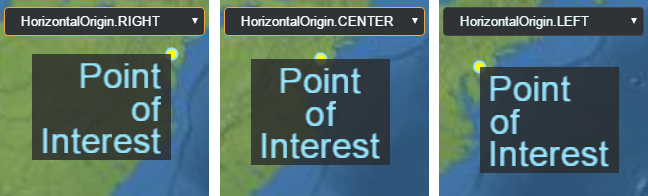
获取或设置此广告牌的水平原点,决定广告牌位于其锚点位置的左侧、中间还是右侧。
Example:
// Use a bottom, left origin
b.horizontalOrigin = Cesium.HorizontalOrigin.LEFT;
b.verticalOrigin = Cesium.VerticalOrigin.BOTTOM;
获取或设置选中此广告牌时返回的用户定义对象。
获取或设置此广告牌使用的图像。如果已经为给定图像创建了纹理,则使用现有的纹理。
此属性可以设置为已加载的图像,一个将被自动加载为图像的 URL, 一个画布,或另一个广告牌的图像属性(来自同一广告牌集合)。
Example:
// load an image from a URL
b.image = 'some/image/url.png';

// assuming b1 and b2 are billboards in the same billboard collection,
// use the same image for both billboards.
b2.image = b1.image;
pixelOffset : Cartesian2
获取或设置此广告牌在屏幕空间中从原点的像素偏移。这通常用于
将多个广告牌和标签对齐到相同位置,例如图像和文本。
屏幕空间的原点是画布的左上角;
广告牌的原点由黄色点指示。
x 从左到右增加,y 从上到下增加。
default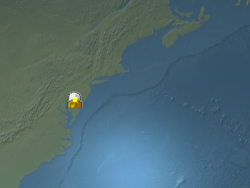 |
b.pixeloffset = new Cartesian2(50, 25);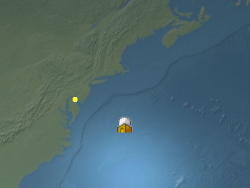 |
pixelOffsetScaleByDistance : NearFarScalar
获取或设置基于广告牌与相机距离的广告牌的远近像素偏移缩放属性。
当相机距离在指定的
NearFarScalar#near 和 NearFarScalar#far 的上下界限内时,
广告牌的像素偏移将会在 NearFarScalar#nearValue 和 NearFarScalar#farValue 之间缩放。
超出这些范围时,广告牌的像素偏移缩放保持在最近的边界。如果未定义,则禁用 pixelOffsetScaleByDistance。
Examples:
// Example 1.
// Set a billboard's pixel offset scale to 0.0 when the
// camera is 1500 meters from the billboard and scale pixel offset to 10.0 pixels
// in the y direction the camera distance approaches 8.0e6 meters.
b.pixelOffset = new Cesium.Cartesian2(0.0, 1.0);
b.pixelOffsetScaleByDistance = new Cesium.NearFarScalar(1.5e2, 0.0, 8.0e6, 10.0);
// Example 2.
// disable pixel offset by distance
b.pixelOffsetScaleByDistance = undefined;position : Cartesian3
获取或设置此广告牌的笛卡尔位置。
当
true 时,此广告牌已准备好渲染,即图像
已下载且 WebGL 资源已创建。
-
Default Value:
false
获取或设置旋转角度(以弧度为单位)。
获取或设置与广告牌的图像大小(以像素为单位)相乘的均匀缩放。
缩放为
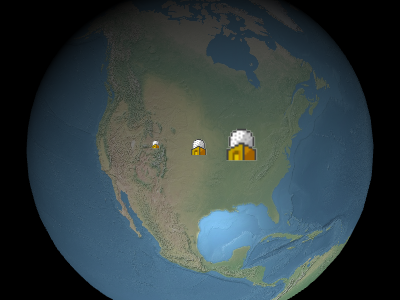
在上面的图片中,从左到右,缩放为
1.0 不会改变广告牌的大小;大于
1.0 的缩放将放大广告牌;小于 1.0 的正缩放将缩小
广告牌。
在上面的图片中,从左到右,缩放为
0.5、1.0 和
2.0。
scaleByDistance : NearFarScalar
获取或设置基于广告牌与相机距离的广告牌的远近缩放属性。
当相机距离在指定的
NearFarScalar#near 和 NearFarScalar#far 的上下界限内时,
广告牌的缩放将在 NearFarScalar#nearValue 和 NearFarScalar#farValue 之间插值。
超出这些范围时,广告牌的缩放保持在最近的边界。如果未定义,则禁用 scaleByDistance。
Examples:
// Example 1.
// Set a billboard's scaleByDistance to scale by 1.5 when the
// camera is 1500 meters from the billboard and disappear as
// the camera distance approaches 8.0e6 meters.
b.scaleByDistance = new Cesium.NearFarScalar(1.5e2, 1.5, 8.0e6, 0.0);
// Example 2.
// disable scaling by distance
b.scaleByDistance = undefined;
确定此广告牌是否可见。使用此属性可以隐藏或显示广告牌,
而不是将其移除并重新添加到集合中。
-
Default Value:
true
获取或设置广告牌的大小是以米还是以像素为单位。
true 表示广告牌的大小以米为单位;
否则,大小以像素为单位。
-
Default Value:
false
splitDirection : SplitDirection
获取或设置此广告牌的
SplitDirection。
-
Default Value:
SplitDirection.NONEtranslucencyByDistance : NearFarScalar
获取或设置基于广告牌与相机距离的广告牌的远近半透明属性。
当相机距离在指定的
NearFarScalar#near 和 NearFarScalar#far 的上下界限内时,
广告牌的半透明度将在 NearFarScalar#nearValue 和 NearFarScalar#farValue 之间插值。
超出这些范围时,广告牌的半透明度保持在最近的边界。如果未定义,则禁用 translucencyByDistance。
Examples:
// Example 1.
// Set a billboard's translucency to 1.0 when the
// camera is 1500 meters from the billboard and disappear as
// the camera distance approaches 8.0e6 meters.
b.translucencyByDistance = new Cesium.NearFarScalar(1.5e2, 1.0, 8.0e6, 0.0);
// Example 2.
// disable translucency by distance
b.translucencyByDistance = undefined;verticalOrigin : VerticalOrigin
获取或设置此广告牌的垂直原点,决定广告牌位于其锚点位置的上方、下方还是居中。
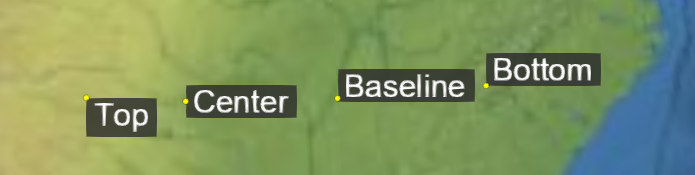
Example:
// Use a bottom, left origin
b.horizontalOrigin = Cesium.HorizontalOrigin.LEFT;
b.verticalOrigin = Cesium.VerticalOrigin.BOTTOM;
获取或设置广告牌的宽度。如果未定义,将使用图像宽度。
Methods
computeScreenSpacePosition(scene, result) → Cartesian2
计算广告牌原点的屏幕空间位置,同时考虑眼睛和像素偏移。
屏幕空间的原点是画布的左上角;
x 从左到右增加,y 从上到下增加。
| Name | Type | Description |
|---|---|---|
scene |
Scene | 场景。 |
result |
Cartesian2 | optional 存储结果的对象。 |
Returns:
广告牌的屏幕空间位置。
Throws:
-
DeveloperError : Billboard must be in a collection.
Example:
console.log(b.computeScreenSpacePosition(scene).toString());See:
确定此广告牌是否等于另一个广告牌。如果所有属性
相等,则广告牌相等。不同集合中的广告牌也可以相等。
| Name | Type | Description |
|---|---|---|
other |
Billboard | 要比较的广告牌。 |
Returns:
如果广告牌相等则返回
true;否则返回 false。
设置要用于此广告牌的图像。如果已经为给定 id 创建了纹理,则使用现有纹理。
此功能对于动态创建在多个广告牌之间共享的纹理非常有用。 只有第一个广告牌会实际调用该函数并创建纹理,而随后的使用相同 id 创建的广告牌将简单地重用现有纹理。
从 URL 加载图像时,设置 Billboard#image 属性更方便。
| Name | Type | Description |
|---|---|---|
id |
string | 图像的 id。可以是唯一标识图像的任何字符串。 |
image |
HTMLImageElement | HTMLCanvasElement | string | Resource | Billboard.CreateImageCallback | 要加载的图像。此参数 可以是已加载的图像或画布,一个将自动加载为图像的 URL, 或一个函数,如果图像尚未加载,则调用该函数以创建图像 |
Example:
// create a billboard image dynamically
function drawImage(id) {
  // create and draw an image using a canvas
  const canvas = document.createElement('canvas');
  const context2D = canvas.getContext('2d');
  // ... draw image
  return canvas;
}
// drawImage will be called to create the texture
b.setImage('myImage', drawImage);

// subsequent billboards created in the same collection using the same id will use the existing
// texture, without the need to create the canvas or draw the image
b2.setImage('myImage', drawImage);
使用具有给定 id 的图像的子区域作为此广告牌的图像,
以从左下角测量的像素为准。
| Name | Type | Description |
|---|---|---|
id |
string | 要使用的图像的 id。 |
subRegion |
BoundingRectangle | 图像的子区域。 |
Throws:
-
RuntimeError : 具有 id 的图像必须在图集内
Type Definitions
Billboard 构造函数第一个参数的初始化选项。
Properties:
| Name | Type | Attributes | Default | Description |
|---|---|---|---|---|
position |
Cartesian3 | 广告牌的笛卡尔位置。 | ||
id |
* |
<optional> |
用户定义的对象,当通过 Scene#pick 选中广告牌时返回。 |
|
show |
boolean |
<optional> |
true | 决定此广告牌是否可见。 |
image |
string | HTMLCanvasElement |
<optional> |
用于广告牌的加载的 HTMLImageElement、ImageData 或图像 URL。 | |
scale |
number |
<optional> |
1.0 | 指定均匀缩放的数值,与广告牌的图像大小(以像素为单位)相乘。 |
pixelOffset |
Cartesian2 |
<optional> |
Cartesian2.ZERO | 指定此广告牌在屏幕空间中从原点的像素偏移的 Cartesian2。 |
eyeOffset |
Cartesian3 |
<optional> |
Cartesian3.ZERO | 在眼睛坐标系中应用于此广告牌的三维笛卡尔偏移的 Cartesian3。 |
horizontalOrigin |
HorizontalOrigin |
<optional> |
HorizontalOrigin.CENTER | 指定此广告牌的水平原点的 HorizontalOrigin。 |
verticalOrigin |
VerticalOrigin |
<optional> |
VerticalOrigin.CENTER | 指定此广告牌的垂直原点的 VerticalOrigin。 |
heightReference |
HeightReference |
<optional> |
HeightReference.NONE | 指定此广告牌的高度参考的 HeightReference。 |
color |
Color |
<optional> |
Color.WHITE | 指定与广告牌的纹理相乘的颜色的 Color。 |
rotation |
number |
<optional> |
0 | 指定旋转角度(以弧度为单位)的数值。 |
alignedAxis |
Cartesian3 |
<optional> |
Cartesian3.ZERO | 指定世界空间中的对齐轴的 Cartesian3。 |
sizeInMeters |
boolean |
<optional> |
指定广告牌大小是以米还是像素为单位的布尔值。 | |
width |
number |
<optional> |
指定广告牌的宽度的数值。如果未定义,将使用图像宽度。 | |
height |
number |
<optional> |
指定广告牌的高度的数值。如果未定义,将使用图像高度。 | |
scaleByDistance |
NearFarScalar |
<optional> |
指定基于广告牌与相机距离的广告牌远近缩放属性的 NearFarScalar。 |
|
translucencyByDistance |
NearFarScalar |
<optional> |
指定基于广告牌与相机距离的广告牌远近半透明属性的 NearFarScalar。 |
|
pixelOffsetScaleByDistance |
NearFarScalar |
<optional> |
指定基于广告牌与相机距离的广告牌远近像素偏移缩放属性的 NearFarScalar。 |
|
imageSubRegion |
BoundingRectangle |
<optional> |
指定用于广告牌的图像子区域的 BoundingRectangle,而不是整个图像。 |
|
distanceDisplayCondition |
DistanceDisplayCondition |
<optional> |
指定此广告牌将在与相机的距离下显示的 DistanceDisplayCondition。 |
|
disableDepthTestDistance |
number |
<optional> |
指定从相机起禁用深度测试的距离的数值,例如,防止与地形的剪切。 | |
splitDirection |
SplitDirection |
<optional> |
指定广告牌的分割属性的 SplitDirection。 |
Cesium.Billboard.CreateImageCallback(id) → HTMLImageElement|HTMLCanvasElement|Promise.<(HTMLImageElement|HTMLCanvasElement)>
创建图像的函数。
| Name | Type | Description |
|---|---|---|
id |
string | 要加载的图像的标识符。 |
Returns:
图像,或一个承诺,该承诺将解析为图像。