
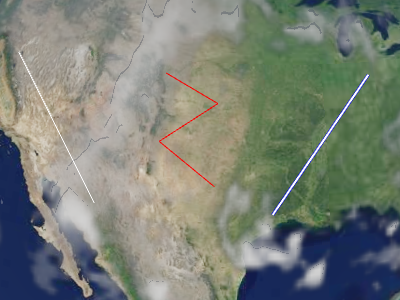
Performance:
为了获得最佳性能,尽量使用几个集合,每个集合包含多个多线段,而不是许多集合,每个集合仅包含几个多线段。组织集合,使得更新频率相同的多线段在同一集合中,即,不变化的多线段应在一个集合中;每帧变化的多线段应在另一个集合中;以此类推。
| Name | Type | Description | ||||||||||||||||
|---|---|---|---|---|---|---|---|---|---|---|---|---|---|---|---|---|---|---|
options |
object |
optional
具有以下属性的对象:
|
Example:
// Create a polyline collection with two polylines
const polylines = new Cesium.PolylineCollection();
polylines.add({
  positions : Cesium.Cartesian3.fromDegreesArray([
    -75.10, 39.57,
    -77.02, 38.53,
    -80.50, 35.14,
    -80.12, 25.46]),
  width : 2
});

polylines.add({
  positions : Cesium.Cartesian3.fromDegreesArray([
    -73.10, 37.57,
    -75.02, 36.53,
    -78.50, 33.14,
    -78.12, 23.46]),
  width : 4
});
See:
Members
此属性仅用于调试;不用于生产环境,且未进行优化。
绘制原语中每个绘制命令的包围球。
-
Default Value:
false
返回此集合中的多线段数量。通常与
PolylineCollection#get 一起使用,以遍历集合中的所有多线段。
modelMatrix : Matrix4
将此集合中的每条多线段从模型坐标转换到世界坐标的 4x4 变换矩阵。
当这是单位矩阵时,多线段在世界坐标中绘制,即地球的 WGS84 坐标。
通过提供不同的变换矩阵(如通过
Transforms.eastNorthUpToFixedFrame 返回的矩阵),
可以使用局部参考框架。
-
Default Value:
Matrix4.IDENTITY
决定此集合中的多线段是否会被显示。
-
Default Value:
true
Methods
add(options) → Polyline
创建并将具有指定初始属性的多线段添加到集合中。
新添加的多线段会被返回,以便稍后可以对其进行修改或从集合中移除。
Performance:
调用 add 后,将调用 PolylineCollection#update,并且
集合的顶点缓冲区将被重写——这是一项 O(n) 操作,同时会产生 CPU 到 GPU 的开销。
为了获得最佳性能,在调用 update 之前尽可能添加更多的多线段。
| Name | Type | Description |
|---|---|---|
options |
object | optional 描述多线段属性的模板,如示例 1 所示。 |
Returns:
被添加到集合中的多线段。
Throws:
-
DeveloperError : 此对象已被销毁,即已调用 destroy()。
Example:
// Example 1:  Add a polyline, specifying all the default values.
const p = polylines.add({
  show : true,
  positions : ellipsoid.cartographicArrayToCartesianArray([
           Cesium.Cartographic.fromDegrees(-75.10, 39.57),
           Cesium.Cartographic.fromDegrees(-77.02, 38.53)]),
  width : 1
});
See:
检查此集合是否包含指定的多线段。
| Name | Type | Description |
|---|---|---|
polyline |
Polyline | 要检查的多线段。 |
Returns:
如果此集合包含该多线段,则返回 true;否则返回 false。
销毁此对象持有的 WebGL 资源。销毁对象可以确保确定性地释放 WebGL 资源,
而不是依赖垃圾回收器来销毁该对象。
一旦对象被销毁,就不应使用它;调用除
一旦对象被销毁,就不应使用它;调用除
isDestroyed 之外的任何函数将导致 DeveloperError 异常。
因此,将返回值(undefined)赋给对象,如示例所示。
Throws:
-
DeveloperError : 此对象已被销毁,即已调用 destroy()。
Example:
polylines = polylines && polylines.destroy();See:
get(index) → Polyline
返回集合中指定索引的多线段。索引是零基的,随着多线段的添加而增加。
移除一个多线段会将其后面的所有多线段向左移动,改变它们的索引。
此函数通常与
PolylineCollection#length 一起使用,以遍历集合中的所有多线段。
Performance:
如果从集合中移除了多线段,而未调用 PolylineCollection#update,
则会执行一个隐式 O(n) 操作。
| Name | Type | Description |
|---|---|---|
index |
number | 多线段的零基索引。 |
Returns:
指定索引处的多线段。
Throws:
-
DeveloperError : 此对象已被销毁,即已调用 destroy()。
Example:
// Toggle the show property of every polyline in the collection
const len = polylines.length;
for (let i = 0; i < len; ++i) {
  const p = polylines.get(i);
  p.show = !p.show;
}
See:
Returns:
如果该对象已被销毁,则返回
true;否则返回 false。
从集合中移除一个多线段。
Performance:
调用 remove 后,将调用 PolylineCollection#update,并且
集合的顶点缓冲区将被重写——这是一项 O(n) 操作,同时会产生 CPU 到 GPU 的开销。
为了获得最佳性能,在调用 update 之前尽可能移除更多的多线段。
如果您打算临时隐藏一个多线段,通常更有效的方法是调用
Polyline#show,而不是移除和重新添加多线段。
| Name | Type | Description |
|---|---|---|
polyline |
Polyline | 要移除的多线段。 |
Returns:
如果多线段被移除则返回
true;如果未在集合中找到该多线段则返回 false。
Throws:
-
DeveloperError : 此对象已被销毁,即已调用 destroy()。
Example:
const p = polylines.add(...);
polylines.remove(p);  // Returns true
See:
从集合中移除所有多线段。
Performance:
O(n)。从集合中移除所有多线段然后再添加新多线段比完全创建一个新集合更有效。
Throws:
-
DeveloperError : 此对象已被销毁,即已调用 destroy()。
Example:
polylines.add(...);
polylines.add(...);
polylines.removeAll();
See:
Throws:
-
RuntimeError : 渲染具有每实例属性的原语需要支持顶点纹理提取。顶点纹理图像单元的最大数量必须大于零。