
| Name | Type | Description | ||||||||||||||||||||||||
|---|---|---|---|---|---|---|---|---|---|---|---|---|---|---|---|---|---|---|---|---|---|---|---|---|---|---|
options |
object |
optional
包含以下属性的对象:
|
Example:
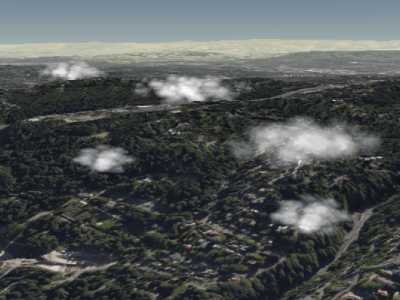
// Create a cloud collection with two cumulus clouds
const clouds = scene.primitives.add(new Cesium.CloudCollection());
clouds.add({
  position : new Cesium.Cartesian3(1.0, 2.0, 3.0),
  maximumSize: new Cesium.Cartesian3(20.0, 12.0, 8.0)
});
clouds.add({
  position : new Cesium.Cartesian3(4.0, 5.0, 6.0),
  maximumSize: new Cesium.Cartesian3(15.0, 9.0, 9.0),
  slice: 0.5
});
Demo:
See:
Members
此属性仅用于调试;不用于生产环境,也未进行优化。
以单一不透明颜色渲染广告牌以便调试。
-
Default Value:
false
此属性仅用于调试;不用于生产环境,也未进行优化。
将云层绘制为不透明的单色椭球体以便调试。
如果debugBillboards也为true,则椭球体将在广告牌上方绘制。
-
Default Value:
false
返回此集合中的云层数量。
控制用于渲染积云的预计算噪声纹理中捕获的细节量。为了使纹理可平铺,这个值必须是二的幂次方。为了获得最佳效果,将其设置为一个在8.0和32.0(包含)之间的二的幂次方。
clouds.noiseDetail = 8.0;
|
clouds.noiseDetail = 32.0;
|
-
Default Value:
16.0
noiseOffset : Cartesian3
对噪声纹理坐标应用位移以生成不同的数据。 如果默认噪声未生成好看的云层,可以修改此值。
default
|
clouds.noiseOffset = new Cesium.Cartesian3(10, 20, 10);
|
-
Default Value:
Cartesian3.ZERO
确定此集合中的广告牌是否会显示。
-
Default Value:
true
Methods
add(options) → CumulusCloud
创建并将具有指定初始属性的云添加到集合中。
返回添加的云,以便后续可以修改或从集合中移除。
Performance:
调用add预期为常数时间。然而,集合的顶点缓冲区将被重写——这是一个O(n)操作,同时会导致CPU到GPU的开销。为了获得最佳性能,请在调用update之前尽可能多地添加云。
| Name | Type | Description |
|---|---|---|
options |
object | optional 描述云属性的模板,如示例1所示。 |
Returns:
被添加到集合中的云。
Throws:
-
DeveloperError : 此对象已被销毁,即destroy()已被调用。
Examples:
// Example 1:  Add a cumulus cloud, specifying all the default values.
const c = clouds.add({
  show : true,
  position : Cesium.Cartesian3.ZERO,
  scale : new Cesium.Cartesian2(20.0, 12.0),
  maximumSize: new Cesium.Cartesian3(20.0, 12.0, 12.0),
  slice: -1.0,
  cloudType : CloudType.CUMULUS
});
// Example 2: Specify only the cloud's cartographic position.
const c = clouds.add({
position : Cesium.Cartesian3.fromDegrees(longitude, latitude, height)
});See:
检查此集合是否包含给定的云。
| Name | Type | Description |
|---|---|---|
cloud |
CumulusCloud | optional 要检查的云。 |
Returns:
如果此集合包含该云,则返回true,否则返回false。
See:
销毁此对象持有的WebGL资源。销毁对象允许确定性地释放WebGL资源,而不是依赖垃圾收集器来销毁此对象。
一旦对象被销毁,它就不应再被使用;调用
一旦对象被销毁,它就不应再被使用;调用
isDestroyed以外的任何函数都将导致DeveloperError异常。因此,将返回值(undefined)赋给对象,如示例所示。
Throws:
-
DeveloperError : 此对象已被销毁,即destroy()已被调用。
Example:
clouds = clouds && clouds.destroy();See:
get(index) → CumulusCloud
返回集合中指定索引处的云。索引从零开始,随着云的添加而增加。移除云会将该云之后的所有云向左移动,改变它们的索引。此函数通常与
CloudCollection#length一起使用,以遍历集合中的所有云。
Performance:
预期为常数时间。如果云已从集合中移除且未调用CloudCollection#update,则会执行隐式的O(n)操作。
| Name | Type | Description |
|---|---|---|
index |
number | 云的零基索引。 |
Returns:
指定索引处的云。
Throws:
-
DeveloperError : 此对象已被销毁,即destroy()已被调用。
Example:
// Toggle the show property of every cloud in the collection
const len = clouds.length;
for (let i = 0; i < len; ++i) {
  const c = clouds.get(i);
  c.show = !c.show;
}
See:
Returns:
如果此对象已被销毁,则返回
true;否则返回false。
从集合中移除一个云。
| Name | Type | Description |
|---|---|---|
cloud |
CumulusCloud | 要移除的云。 |
Returns:
如果云被移除则返回
true;如果云未在集合中找到则返回false。
Throws:
-
DeveloperError : 此对象已被销毁,即destroy()已被调用。
Example:
const c = clouds.add(...);
clouds.remove(c);  // Returns true
See:
从集合中移除所有云。
Performance:
O(n)。从集合中移除所有云然后添加新的云比完全创建一个新集合更有效。
Throws:
-
DeveloperError : 此对象已被销毁,即destroy()已被调用。
Example:
clouds.add(...);
clouds.add(...);
clouds.removeAll();